年付方案限时 5 折

Paper Banana AI 科研图生成器

把方法段落、实验结果、Prompt 模板或草图变成清晰科研图,用于论文、海报、基金和汇报。

公开研究依据:5 个 Agent · 292 个 NeurIPS 2025 案例 · 4 项评估标准

Academic illustration preview
图片预览

生成后的科研配图草稿会显示在这里。

方法段落到图表草稿工作流

Paper Banana 图库

浏览模型架构、方法流程、评估面板和论文风格科研图 prompt 案例。选择一个接近的案例,再替换成你的研究内容。

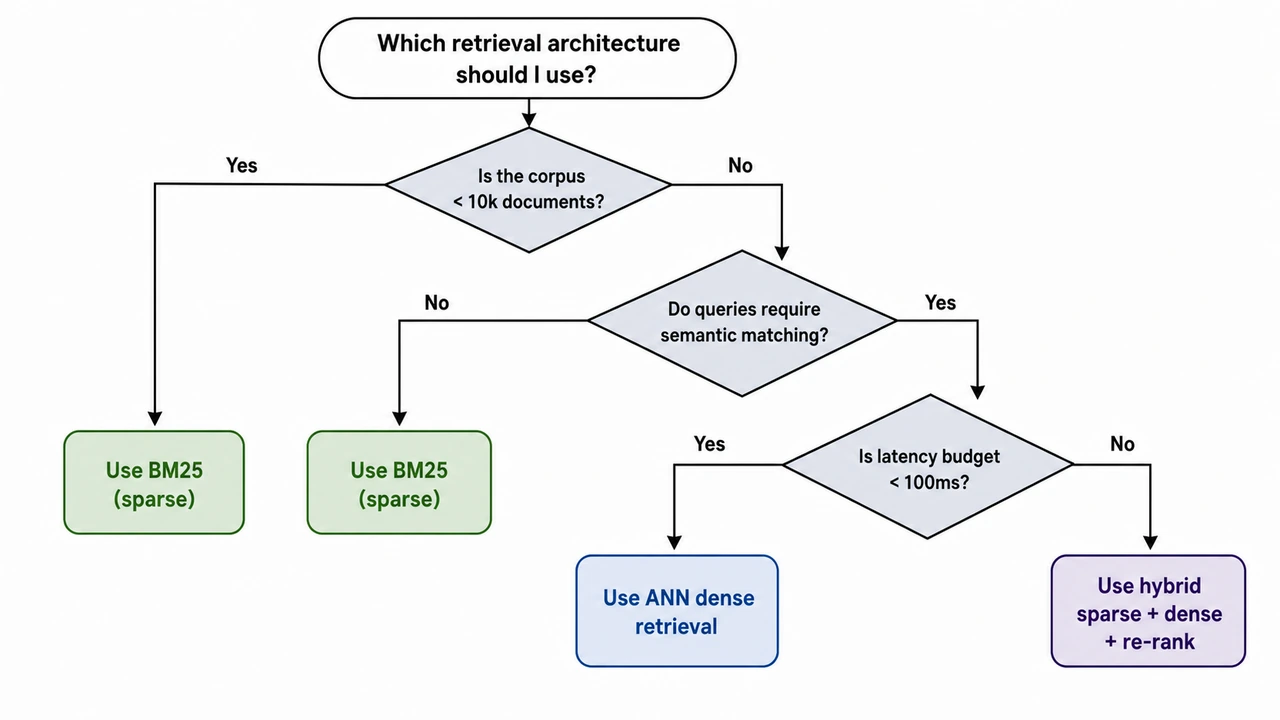
Decision-Tree Selection Workflow

Decision-Tree Selection Workflow

A decision-tree selection workflow drawn top-down. Top — Starting Question (oval node): "Which retrieval architecture should I use?" Three sequential decision nodes (diamonds) below, each binary: Q1 — "Is the corpus < 10k documents?" - Yes -> "Use BM25 (sparse)" (leaf, green) - No -> continue to Q2 Q2 — "Do queries require semantic matching?" - No -> "Use BM25 (sparse)" (leaf, green) - Yes -> continue to Q3 Q3 — "Is latency budget < 100ms?" - Yes -> "Use ANN dense retrieval" (leaf, blue) - No -> "Use hybrid sparse + dense + re-rank" (leaf, purple) Three colored leaf nodes at the bottom showing the recommendations. Style: clean academic vector, white background, restrained palette (slate diamonds, green / blue / purple leaves), sans-serif. Branch labels ("Yes" / "No") on every edge. Optimised for poster and slide readability.
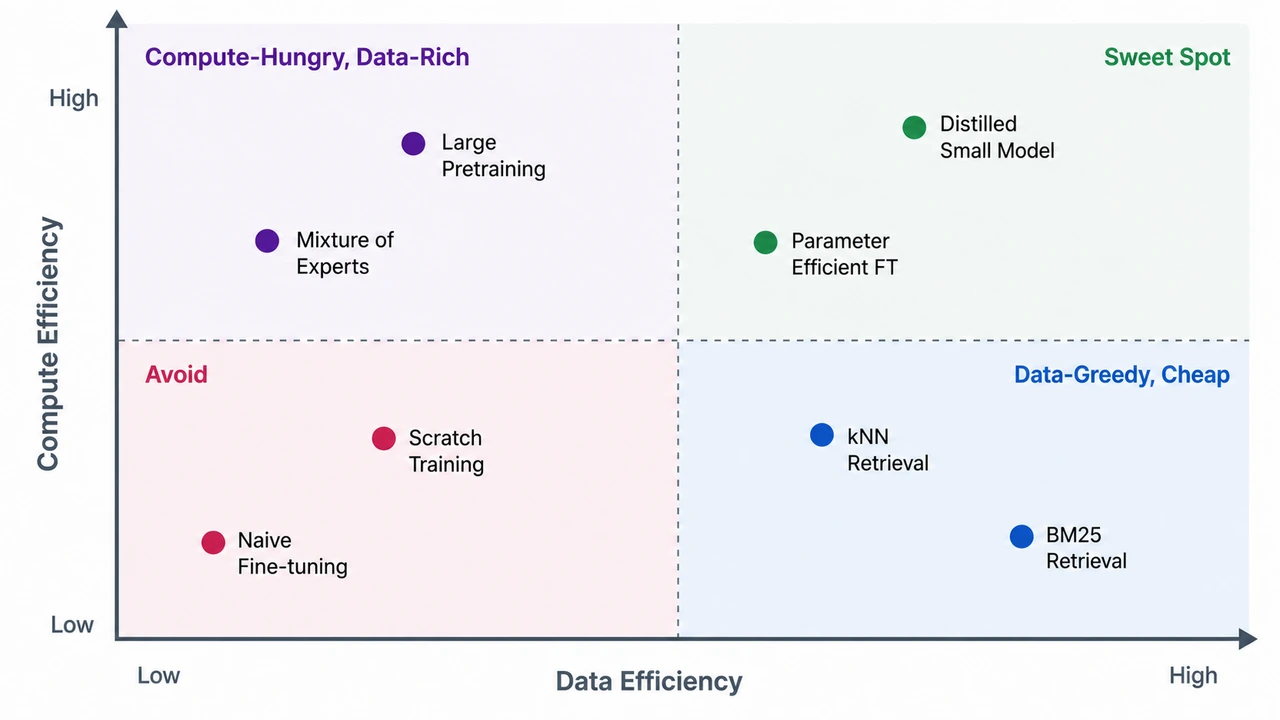
集中式学习 vs 联邦学习 vs 无数据融合

集中式学习 vs 联邦学习 vs 无数据融合

A 2x2 positioning matrix with two axes and four labeled quadrants. Axes: - X-axis (horizontal): "Data Efficiency" — left = low, right = high - Y-axis (vertical): "Compute Efficiency" — bottom = low, top = high Four quadrants: - Top-left: "Compute-Hungry, Data-Rich" — methods that need lots of compute and tolerate data scarcity (e.g., huge pretraining) - Top-right: "Sweet Spot" — high efficiency on both axes (e.g., distilled small models) - Bottom-left: "Avoid" — both inefficient (e.g., naive scratch training) - Bottom-right: "Data-Greedy, Cheap" — needs lots of data but cheap to run (e.g., kNN retrieval) Plot 6-8 example methods as labeled dots distributed across all four quadrants. Each dot has a 1-2 word label. Style: clean publication-style scatter, white background, slate axes with one accent color per quadrant, sans-serif. Quadrant headers in upper-corner of each quadrant. Suitable for survey papers and consultancy decks.

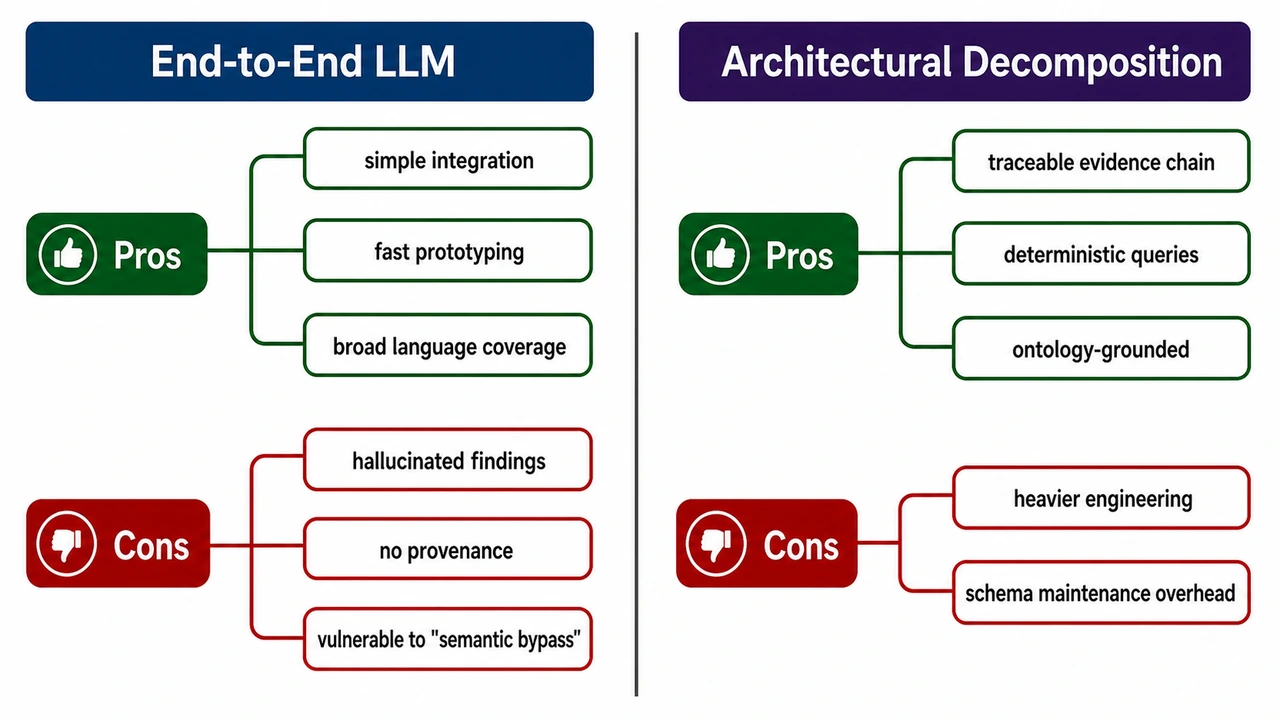
Method Comparison Mind Map (Pros vs Cons)

Method Comparison Mind Map (Pros vs Cons)

A horizontal mind-map comparing two approaches for vulnerability discovery in source code. Left side: "End-to-End LLM" Right side: "Architectural Decomposition" Each side has two color-coded branches: - Pros (dark green) - Cons (dark red) End-to-End LLM Pros: simple integration; fast prototyping; broad language coverage. Cons: hallucinated findings; no provenance; vulnerable to "semantic bypass". Architectural Decomposition Pros: traceable evidence chain; deterministic queries; ontology-grounded. Cons: heavier engineering; schema maintenance overhead. Layout: central vertical divider; method title at top of each side in a colored header bar; pros branches above, cons below. Use clean rounded labels, generous whitespace, sans-serif typography. Optimize for poster readability. White background.

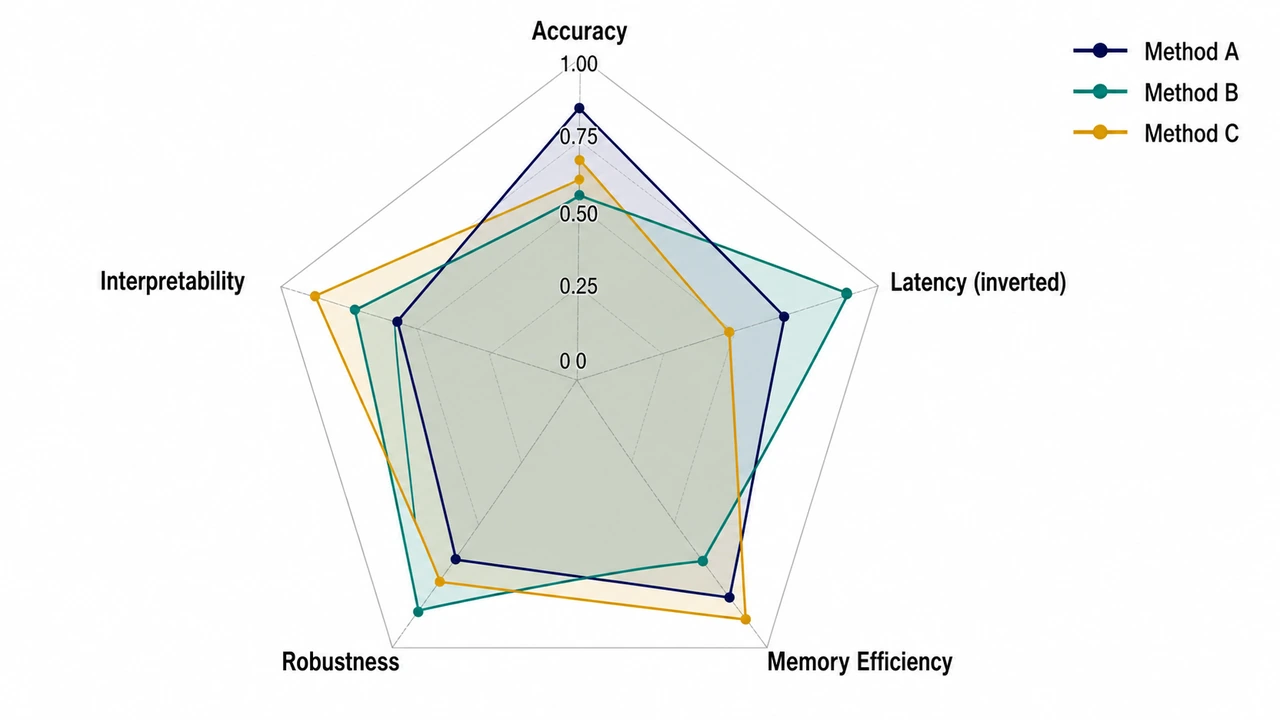
Method Comparison Radar Chart

Method Comparison Radar Chart

A radar (spider) chart comparing three methods on five evaluation dimensions. Five axes (radiating from center, going clockwise from top): 1. Accuracy 2. Latency (inverted: higher = lower latency) 3. Memory Efficiency 4. Robustness 5. Interpretability Three methods plotted as colored polygons: - Method A (navy fill at 25% opacity, navy border) - Method B (teal fill at 25% opacity, teal border) - Method C (amber fill at 25% opacity, amber border) Numeric scores 0-1 along each axis, with grid rings at 0.25 / 0.50 / 0.75 / 1.00. Legend top-right with the three methods and their colors. Style: clean academic radar chart, white background, restrained palette, sans-serif labels. Optimise for legibility on a poster.

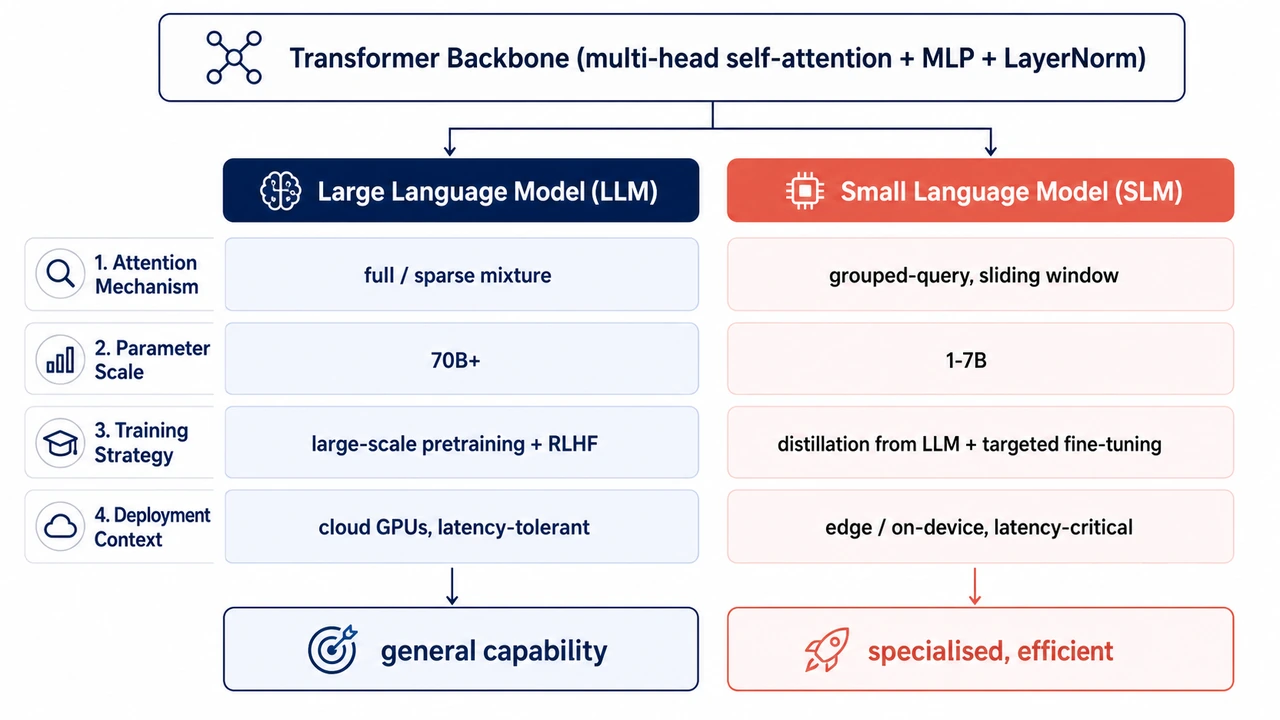
Shared-Foundation, Divergent-Choices Comparison

Shared-Foundation, Divergent-Choices Comparison

Create a clean comparison diagram titled "Shared Foundation, Divergent Choices" for an academic paper. Layout: - Top: one wide shared foundation block labeled "Shared pretraining foundation" with small icons for data, tokenizer, transformer layers, and optimization. - From the shared block, split into two parallel columns: "System A" and "System B". - Add four comparison rows: Attention pattern, Model scale, Training objective, Deployment context. - Each row should show matched but divergent choices, connected back to the shared foundation with subtle branching arrows. - Bottom: two outcome boxes labeled "Efficiency / controllability" and "Capability / generalization". Style: - Publication-ready vector-like diagram on white background. - Navy foundation block, teal System A accents, coral System B accents, neutral gray dividers. - Use concise labels only, maximum 6 words per cell. - Include small schematic icons but no decorative clutter. - Sans-serif typography, high contrast, suitable for a methods or related-work figure.

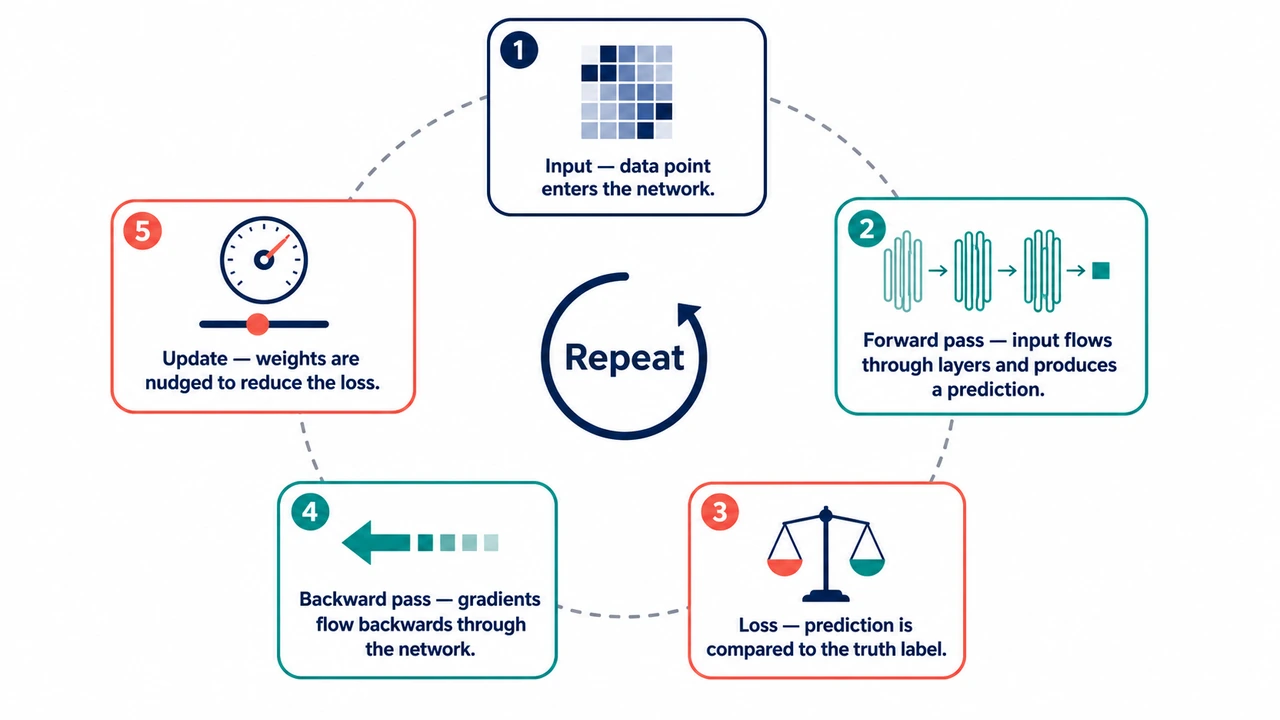
概念流程循环图

概念流程循环图

An educational infographic showing how a neural network learns, in five steps arranged around a circle. Steps (clockwise, starting from 12 o'clock): 1) Input — data point enters the network. Icon: small grid of pixels. 2) Forward pass — input flows through layers and produces a prediction. Icon: stacked rectangles with arrows. 3) Loss — prediction is compared to the truth label. Icon: balance scale. 4) Backward pass — gradients flow backwards through the network. Icon: backward arrow. 5) Update — weights are nudged to reduce the loss. Icon: small dial / slider. Center of the circle: a small "Repeat" label with a circular arrow. Style: - Friendly but professional palette: navy, teal, coral on white. - Each step is a rounded rectangle on the circle's perimeter, with the icon on top and a one-line caption (max 6 words) below. - Numbered badges (1–5) in the top-left of each step. - Light dashed circle connecting the steps to suggest the cycle. - Sans-serif, optimized for textbook-page readability.

静态图片PNG
可编辑重建前的静态论文图
可编辑重建
重建后的可编辑论文图

编辑元素

改文字 / 箭头

什么是 Paper Banana?

Paper Banana 是一个面向科研图表的 AI 生成器,把方法段落、prompt 模板、草图和参考图转成结构化的学术图。它适合需要方法框架图、模型架构图、统计可视化和投稿导向插图的研究者,让你不用从空白幻灯片开始画。

结构优先生成

Paper Banana 优先处理模块层级、标签、箭头、版式结构和可读性,而不是先追求装饰效果。

参考图引导的学术风格

可以用 prompt 示例或参考图引导图表类型、视觉风格和术语表达,使结果更接近论文图常见规范。

可编辑、可审阅的图表

生成结果定位为可检查的初稿:继续改标签、修关系、调布局,再用于论文、海报、基金或 slides。

Paper Banana 可以生成什么?

Paper Banana 可以从方法段落、Prompt 模板、空白画布、草图或旧图开始,生成方法框架图、模型架构图、可编辑重建图和投稿前可继续修改的科研图。

方法框架图

方法框架图

从空白画布、方法段落或 prompt 模板开始,Paper Banana 先给出模块、箭头、布局和短标签,让你有东西可检查。

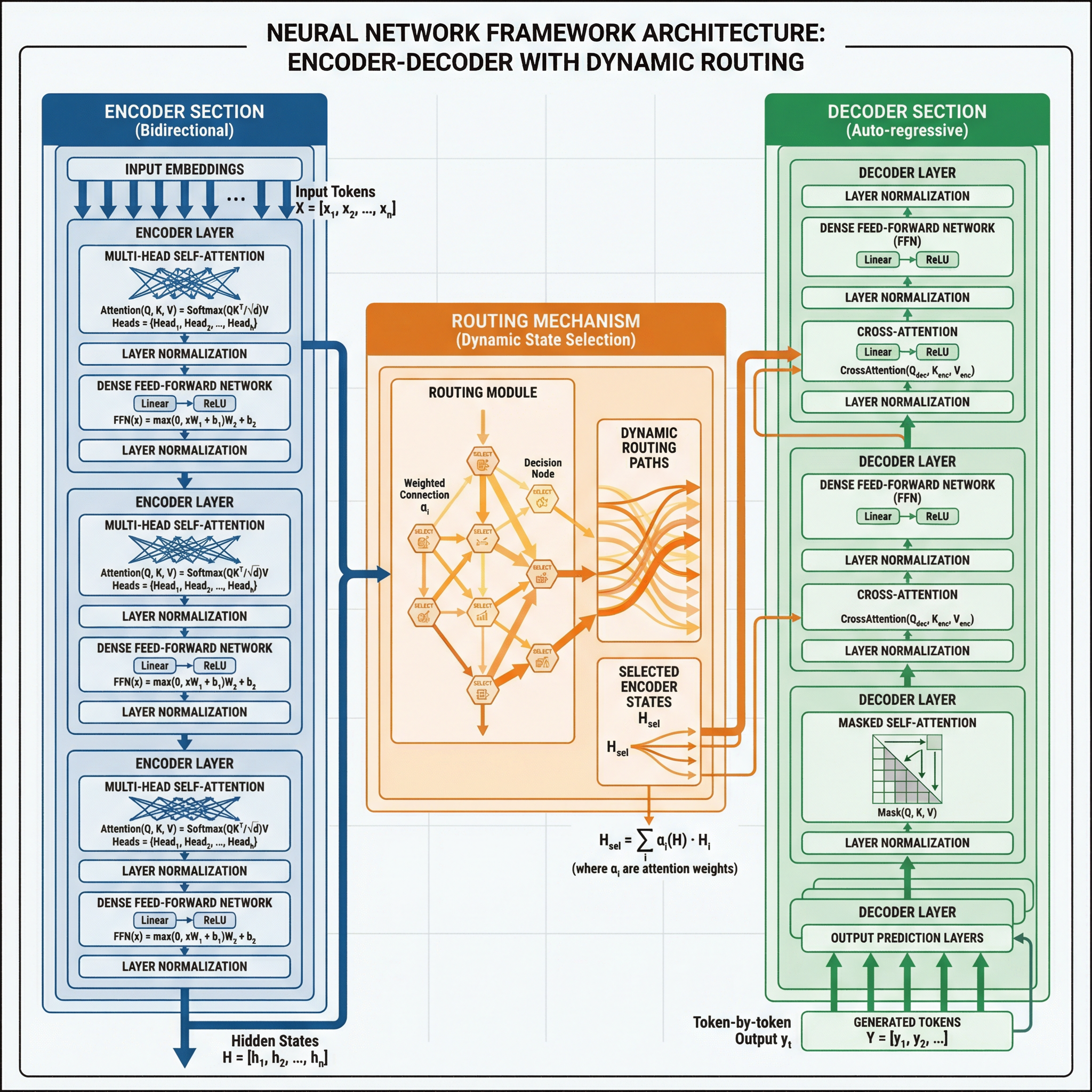
静态图片PNG
可编辑重建前的静态论文图
可编辑重建
重建后的可编辑论文图

编辑元素

改文字 / 箭头

可编辑论文图重建

生成后还能改文字、箭头、颜色和布局,不用接受一张后续难修改的 AI 图片。

Prompt 驱动的科研图

Prompt 驱动的科研图

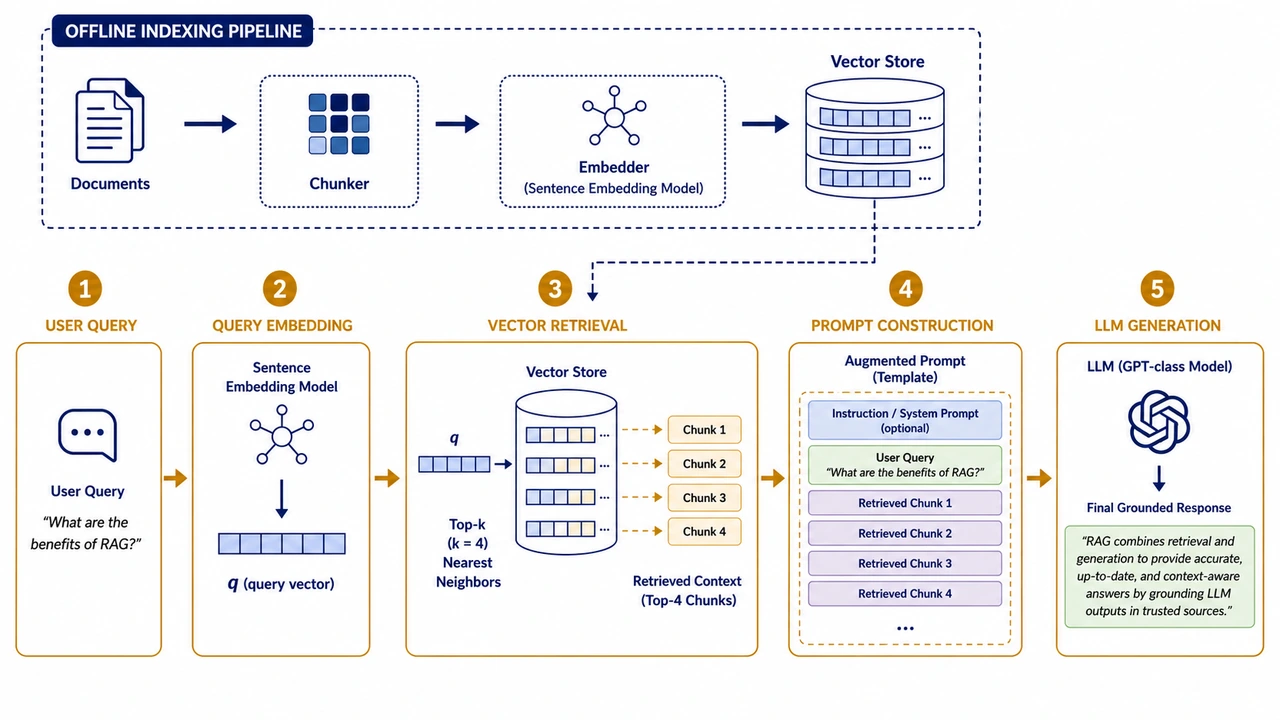
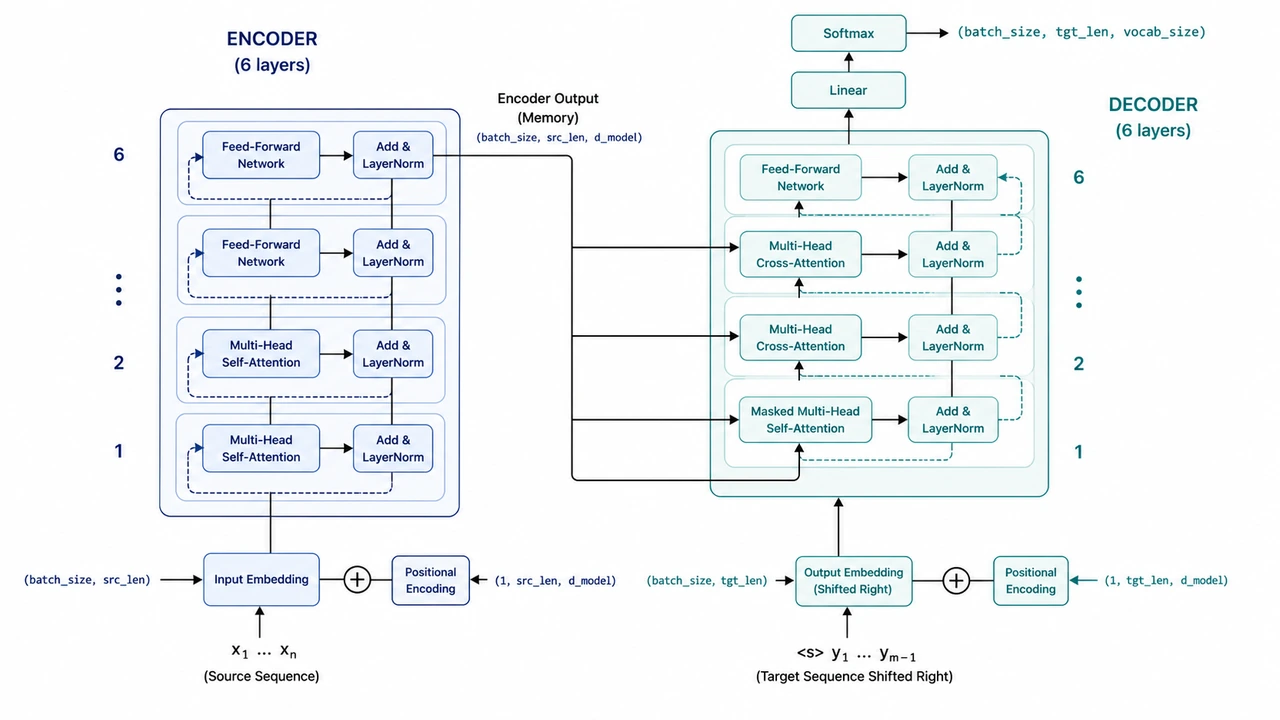
从 RAG、Transformer、Agent workflow、训练流程、海报和论文图模板开始,减少泛泛 prompt 带来的跑偏。

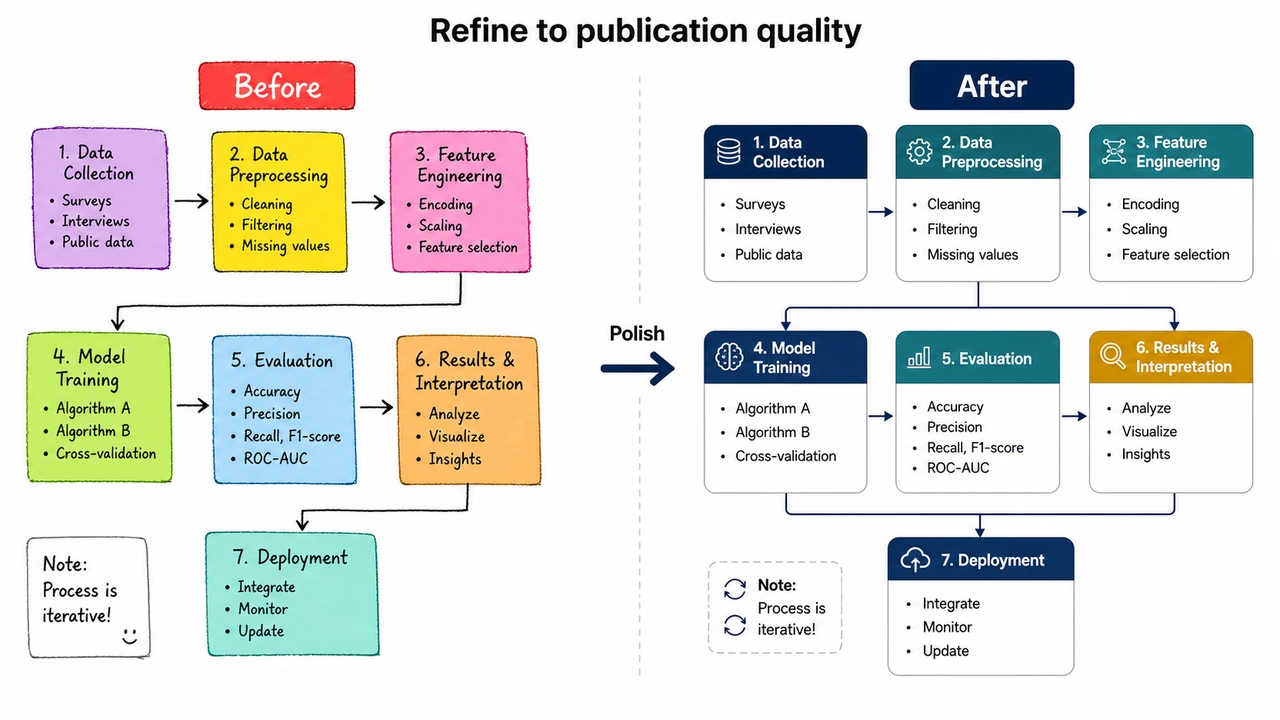
手动草稿变成可发表论文图

手动草稿变成可发表论文图

用手绘草稿、截图或旧图做参考,Paper Banana 将其重建成干净的论文级科研图,投稿前仍可检查标签、关系、公式和数据含义。

使用方式

如何使用 Paper Banana

无需安装、无需设计软件、不浪费时间。使用 Paper Banana 时会发生这些事。

1

粘贴论文内容

将方法论段落、摘要或实验结果复制到 Paper Banana。也可用自然语言描述图表或上传草图,支持文字、JSON 和 CSV。

2

AI 生成并优化

AI 分析内容、规划版式、应用学术风格并渲染图表。先得到可检查的结构化图表,再继续精修。

3

下载并投稿

下载适合期刊、会议、海报或汇报的高清图。需要修改时,用自然语言说明,继续优化输出。

价格

Paper Banana 价格

1K 科研图 5–8 积分,2K/4K 按分辨率和模型消耗更多。先用积分包完成一次论文冲刺,或用订阅支持持续的实验室和投稿工作流。

查看完整价格
50% OFF

Basic

$12.49/月
$299.88$149.9/年省 50%

科研图约 $0.1–$0.17 / 张

适合完成一篇论文、海报或组会配图

安全支付 · 可随时取消


  • 600 积分/月(7,200 积分/年)
  • 约 900-1,440 张科研图 / 年
  • 全部 AI 图片模型:GPT Image 2、Nano Banana 2 / Pro
  • 从论文内容或学术模板生成科研图
  • 上传参考图,保持论文的统一视觉风格
  • 无水印高清 PNG,可转可编辑 PPT / draw.io
  • 个人与商业项目均可使用

    积分有效期:年付订阅周期内

    50% OFF

    Enterprise

    $49.95/月
    $1,198.8$599.4/年省 50%

    科研图约 $0.07–$0.11 / 张

    适合实验室、课题组与多项目并行出图

    安全支付 · 可随时取消


    • 3,600 积分/月(43,200 积分/年)
    • 约 5,400-8,640 张科研图 / 年
    • 全部 AI 图片模型:GPT Image 2、Nano Banana 2 / Pro
    • 覆盖投稿、基金、组会、课程等高频科研配图场景
    • 论文内容 + 参考图驱动的连续迭代
    • 无水印高清 PNG,可转可编辑 PPT / draw.io
    • 个人与商业项目均可使用

      积分有效期:年付订阅周期内

      一次性购买暂不想订阅?先买积分
      $6.99
      100 积分 · 一次性购买 · 无订阅

      先完成更多出图,再决定是否订阅。每个账户限购一次。

      安全可靠的 Stripe 支付
      支持的支付方式标识

      常见问题

      Paper Banana 主要适合谁?+

      优先适合正在写论文、赶投稿、做 camera-ready、准备海报、基金或组会汇报的 AI/ML、CS、工程和科研作者。Paper Banana 帮你从空白画布、方法段落或 prompt 模板生成一张可继续检查和编辑的科研图。

      Paper Banana 解决的核心痛点是什么?+

      很多科研作者知道方法怎么工作,但不想花几个小时从空白 PPT 或 Illustrator 画布开始摆模块、对齐箭头和写短标签。Paper Banana 先生成一张结构清晰的科研图,你再用自己的专业判断修正最后细节。

      生成图可以直接用于论文发表吗?+

      建议把 AI 输出当作需要审阅的论文配图,而不是完全免审的最终稿。投稿前仍应检查文字、箭头关系、公式、模块含义和数据逻辑;关键标签可在 PPT、draw.io、Figma、Illustrator 或其他工具中修正。

      为什么不直接用普通 AI 图片工具?+

      普通 AI 图片工具更擅长视觉效果,但科研图更看重结构、短标签、箭头关系、方法忠实度和可编辑性。Paper Banana 的模板、导出格式和默认提示词围绕这些论文场景设计。

      一次生成需要多少积分?+

      1K 图片通常 5–8 积分,2K 通常 8–18 积分,4K 通常 16–40 积分。PPT 和 draw.io 可编辑导出各额外 +8 积分,生成按钮会在提交前显示本次准确消耗。

      如果生成失败会怎样?+

      如果服务商侧生成失败,系统会尽量返回错误状态并保留你的工作流。遇到账单、重复扣费或技术失败,可以带账户邮箱和订单信息联系支持团队复核。

      我的 prompt、论文内容和参考图是否私密?+

      请按当前产品条款和隐私政策使用 Paper Banana,不要上传你无权处理或不能外发的敏感内容。需要团队级隐私、发票或更明确的数据处理要求时,建议购买前联系支持确认。

      我应该买积分包还是订阅套餐?+

      如果只是为一篇论文、一次海报或一次汇报集中出图,先买一次性积分包更灵活。如果你每周都要生成科研图、海报、slides 或技术内容,月度套餐通常更合适。

      现在用 Paper Banana 生成你的第一版科研图

      选择一个 prompt,或直接写下你要表达的方法流程。先生成可检查的科研图,再决定是否导出高清 PNG、draw.io 或 PPT。

      生成可投稿科研图